

Running your site in another language, but following a tutorial or documentation in English? Simple Admin Language Change pulls the language selector out of your profile settings and into the admin bar, so you switch languages without clicking through to your profile. The plugin is lightweight and builds on what WordPress already does.
What it does
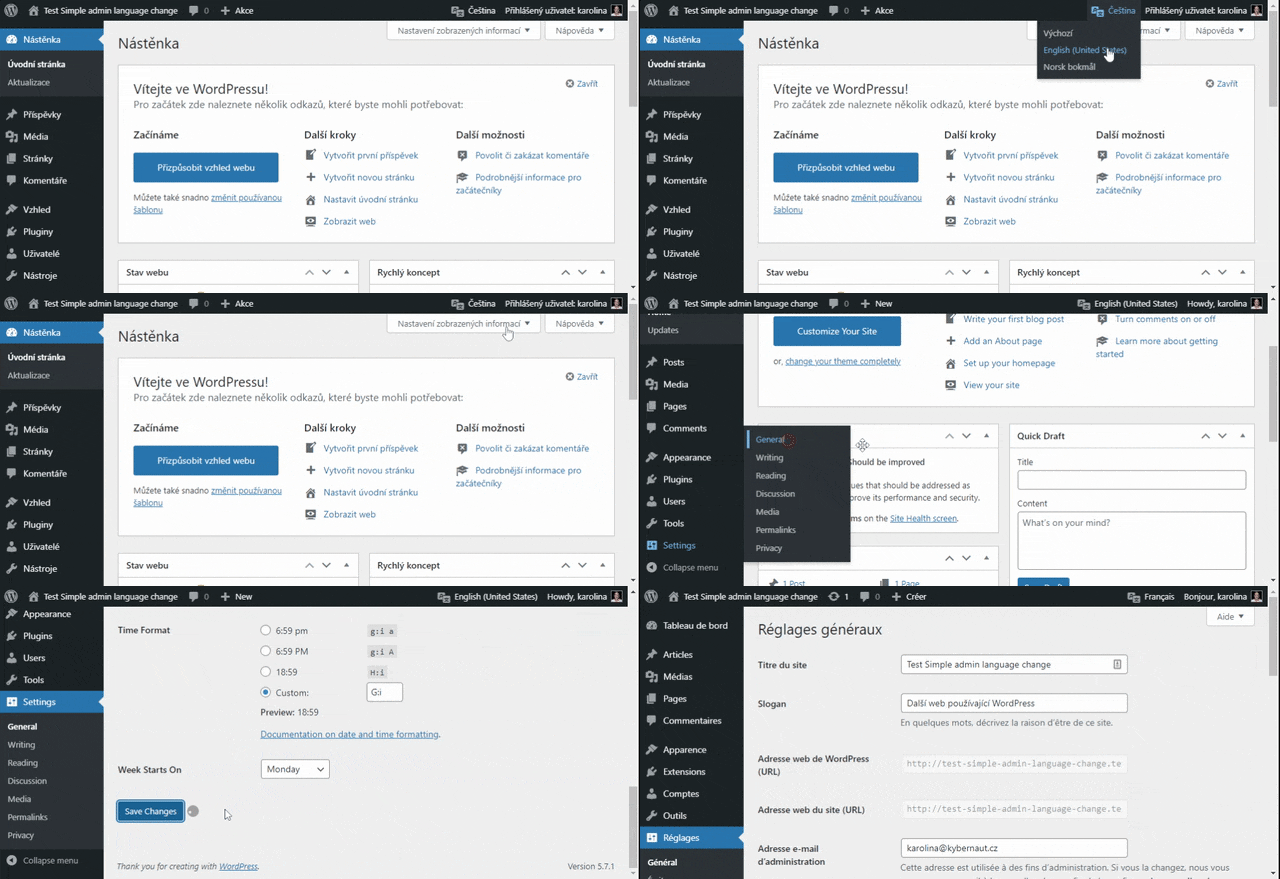
- Admin bar switcher: switch the admin language from a dropdown in the admin bar.
- A language for each user: it changes the language only for the logged-in user; the site language stays the same.
- For every role: any logged-in user with the “read” capability can switch, subscribers included.
- Installed languages: the dropdown shows the languages installed in WordPress.
- Admin only: the switcher doesn’t appear on the front end.
- Custom language list: developers pick which languages appear in the dropdown with a filter.
Settings
To switch to a language that’s missing from the dropdown, install it first: in Settings → General, select it as the site language, save the changes and then switch the site language back. Developers can use the salc_languages filter to choose which languages appear in the dropdown; the Customization section on GitHub explains how.
Get involved
The plugin is free and open source. Reporting a bug, suggesting an improvement or leaving a review helps it most.
Do you need customization?
Modifications that will enhance the plugin development and help other users I offer for “adoption”. You pay half the development cost and I’ll deliver the other half for free.
If the modifications are only of limited use, are only for your usage, or do not match my idea of the plugin’s direction, they are charged at full price.